Web application development cost: from internal tool to SaaS platform
Web application development cost is decided by what the application does for its users, not by how many pages it has. A dashboard for one team and a B2B platform where clients, managers and partners share the same records can look alike in a demo and differ fivefold in price. This guide gives typical 2026 ranges, shows which parts of a web app carry the cost — most of them invisible — and explains how to plan a budget you can defend.
On this page
- Website or web application: why they are priced differently
- Typical ranges in 2026
- Where the money goes
- An example from our work: ECO.NOVA
- Does the technology change the price?
- Running costs after launch
- How to keep a web app budget under control
- A worked example: one company, three parts
- Seven questions to ask about any web app quote
- How EVA-X prices a web application
- Questions and answers
Website or web application: why they are priced differently
A website tells people about your company. A web application does work for them: it takes orders, calculates, stores documents and shows every user their own data. Pricing follows that difference. A website is mostly content and design; a web application is mostly accounts, permissions, data and the logic between them. If your project has a sign-in, it is probably a web application, and a quote built on “pages” will miss most of the work. Website vs web application draws the line in detail.
Typical ranges in 2026
An orientation for quotes from studios in Ukraine and Eastern Europe, not a price list; your scope decides the number, and the estimate prices yours module by module.
| Type | Typical content | Typical range | Typical timeline |
|---|---|---|---|
| Internal tool or dashboard | One team, one or two data sources, tables, filters, export | $8,000–$25,000 | 2–5 weeks |
| Client portal | Sign-in, orders and statuses, documents, invoices, notifications | $20,000–$60,000 | 4–10 weeks |
| B2B platform | Several roles, document flow, approvals, integrations, audit | $40,000–$120,000 | 2–5 months |
| SaaS product | Accounts for many companies, subscriptions or invoices, onboarding, settings, admin | $40,000–$150,000+ | 2–6 months |
The ranges are wide on purpose: within one type, the drivers below move the price. If your project combines several rows — a client portal plus an internal dashboard for management, say — price each part separately instead of looking for the one row that describes everything.
A SaaS MVP does not have to start in the SaaS row. A narrow version with one workflow, one plan and onboarding done by hand sits in the single-flow web MVP band, about $12,000–$35,000; the full SaaS layer comes when paying customers ask for it.
Where the money goes
Roles and permissions
The question “who may see and change what?” drives web app cost more than any screen. A portal where every client sees only their own orders, a manager sees their clients and an administrator sees everything needs those rules on the server, for every record and every file — not just hidden buttons in the interface. Each extra role multiplies the cases to build and test.
Data and documents
Orders with attached contracts, acts, photos and scans; versions; who uploaded what and when. Generating documents from data — a contract filled in from the order, an invoice from a payment — is a module of its own, and so is e-signing.
Integrations
Accounting, CRM, payment providers, email and SMS, maps, a partner’s API. The cost depends less on the number of integrations than on their quality: a documented REST API with a test environment is predictable; a nightly file export from an old system is not.
Security
Strict sessions, owner checks on every file and record, validated uploads, a log of sensitive actions, protection against the usual web attacks. For platforms with money or personal data, a security pass before launch belongs in the budget, not in your hopes.
Multi-tenancy and billing
This is the SaaS layer: keeping companies’ data apart, plans and limits, subscriptions or invoicing, trial periods, onboarding, team invitations. It is what makes a SaaS more expensive than a portal with the same screens.
Notifications
Email, SMS, push and in-app messages: who is told about what, through which channel, with which template, and how a user switches them off. Each event that triggers a message — an order approved, a document signed, an invoice overdue — is small on its own; together they add up to a noticeable module.
Reports and dashboards
Charts look cheap in a design and become expensive when the data behind them comes from several sources, has to be correct to the cent and must load fast on a year of history.
The public side
Web apps often come with a site in front: service pages, SEO, request forms connected to the system. It is a separate module with its own design and content work.
| Cost driver | Small impact | Large impact |
|---|---|---|
| Roles | One role plus an admin | Four or more roles with different data access |
| Documents | Uploads only | Generated documents, versions, e-signatures |
| Integrations | A payment provider and email | Accounting, legacy exports, partner APIs |
| Security | Standard sessions | Audit log, security pass, regulated data |
| Reports | CSV export | Live dashboards across several sources |
| SaaS layer | One company | Many companies, plans, billing, limits |
An example from our work: ECO.NOVA
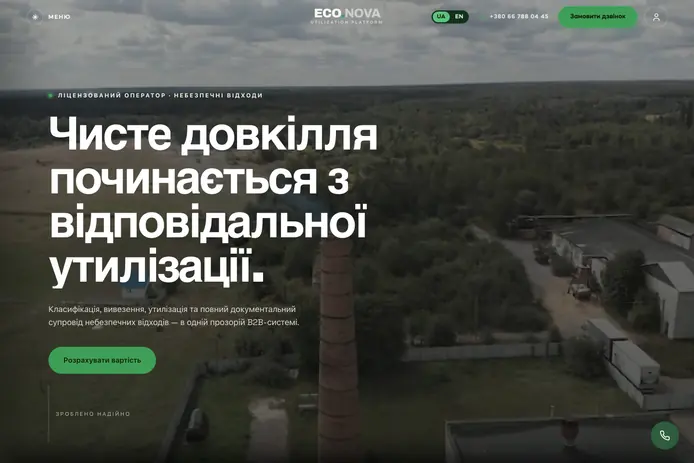
ECO.NOVA is a licensed hazardous waste operator in Ukraine. We built its public site and the B2B system behind it: a business orders a pickup, follows it and gets every document in one place; managers run orders, contracts and files in their own cabinet; administrators control access and audit. On the public side there are pages per waste category, a waste code catalogue and a disposal cost calculator.
The parts that carry the weight are the ones a visitor never sees. Every order carries its documents and status, private files open only for their owner and manager, every sensitive action is logged, and the platform went through a full security pass before launch. When you compare quotes for a client portal, look for these lines. If they are missing, the portal will either be cheaper and unsafe, or the cost will arrive later.
Does the technology change the price?
Less than people think. A mainstream stack — React and Next.js for the interface, Python or Node.js for the backend, PostgreSQL or MongoDB for the data — keeps both the build and future hiring affordable. What raises the price is the exotic: a niche framework, a database chosen for fashion, or a microservices architecture for a product with one team. If a vendor proposes something unusual, ask which problem it solves for you. More on our default choice in why Next.js for business websites and web apps.
A related question is ready-made services. For commodity parts — sign-in, payments, email delivery — proven services beat custom code: cheaper at the start and more reliable later. Write custom code where your business differs from everyone else’s.
Running costs after launch
- Hosting and databases — modest for a portal, growing with files, users and background jobs.
- Third-party services — email delivery, SMS, maps, e-signature, AI models, each with its own tariff.
- Monitoring and backups — not optional once clients depend on the system.
- Support and changes — new roles, documents and integrations as the business changes.
Ask your vendor to list these as separate lines, with who pays for each and in whose name the accounts are registered. Accounts in your company’s name save a lot of trouble later.
How to keep a web app budget under control
- Start with the role that brings the money in. Often that is the client cabinet; staff tools can be plainer at first.
- Build the admin from standard components. Nobody needs a designed back office in version one.
- Replace dashboards with exports at first. Learn which numbers people actually look at, then chart those.
- Deliver in modules and use them early. A portal that takes orders can go live before the reports are ready.
- Pick the build format by risk. Internal dashboards fit AI Build; client-facing portals usually go AI + DEV; platforms with payments, personal data or regulated documents deserve DEV.
If you are planning a portal or a SaaS, two companion guides go deeper: client portal development and how to build a SaaS MVP.
A worked example: one company, three parts
Say a freight forwarding company wants three things: a dashboard where dispatchers see every shipment, a portal where clients track their cargo and download documents, and, later, access for partner carriers who update statuses themselves.
Priced as one “platform”, the request lands somewhere vague between $40,000 and $120,000. Priced in parts, it becomes a plan:
| Part | Row in the table | When |
|---|---|---|
| Dispatcher dashboard on existing data | Internal tool, $8,000–$25,000 | First |
| Client portal with tracking and documents | Client portal, $20,000–$60,000 | Second, on the same backend |
| Carrier access with its own role and rules | Turns the whole into a B2B platform | Once the first two are in use |
Splitting does not make the work cheaper by some trick. It spreads the cost over time, lets each part be built once it has users, and lets the later parts reuse the accounts, data and access rules of the first. Each part is accepted on its own, so the dashboard can be in daily use while the portal is still being built.
Seven questions to ask about any web app quote
- Which roles are included, and what can each one see? If the answer is “users and an admin”, ask about managers, partners and read-only access.
- Are access rules checked on the server? Hiding a button is not security; every request must be checked against the record’s owner.
- What happens to files? Where they are stored, who can open them, whether uploads are checked.
- Which integrations are in scope, and who provides access to them? A missing API key can stall a module for weeks.
- Is the admin panel included? And what can your team do there without a developer?
- How does acceptance work? How you review each part, how long you have, and what counts as a defect.
- What happens after launch? The warranty period, who hosts the system, and how changes are priced.
A vendor who answers these in writing gives you a quote you can compare. One who answers “it’s all included” gives you a number.
How EVA-X prices a web application
Describe the product in your own words — text, a link, a file or a voice message — and the estimate splits it into modules — roles, screens, integrations, the admin — with hours, a timeline and a price in about 15 seconds. The estimate is free and non-binding, and our team reviews it with you before anything is signed; then the contract fixes the price, and it does not grow with the hours. Each module arrives in your cabinet for review, and you have 7 calendar days to accept it or send it back with a reasoned list of fixes. More on what we build: web application development.
Questions and answers
How much does a simple web application cost?
An internal tool for one team — tables, filters, a form or two, an export — typically falls around $8,000–$25,000. As soon as external users sign in to see their own data, it becomes a client portal, and $20,000–$60,000 is the more realistic orientation. Roles, documents and integrations decide where in the range you land.
Why does a web application cost more than a website?
A website is mostly content and design. A web application stores data, checks who may see and change each record, sends notifications, generates documents and talks to other systems. That logic lives on the server and has to be built and tested for every role, which is where most of the hours go.
How much does a SaaS MVP cost?
As an orientation, a narrow SaaS MVP with one workflow sits in the single-flow web MVP band, $12,000–$35,000. A SaaS product with billing, plans, team management and integrations in version one runs $40,000–$150,000 and more. To start at the lower end: one plan, invoices instead of automated subscriptions, onboarding done by hand — and the multi-company layer designed in from the start.
What does it cost to run a web application every month?
There is no honest single figure. For a small portal, servers are usually a modest line; third-party services such as email, SMS, maps or AI models, plus monitoring, backups and support, often cost more. Ask for every running cost listed separately, with the accounts registered in your company’s name.
Can we launch part of the platform first?
Yes, and it is usually the better plan. Split the platform into modules and launch the one that brings value soonest — often the client cabinet with orders — while reports and secondary roles are still being built. At EVA-X each module is delivered, reviewed and accepted separately, so the first one can go live early.
Which technology stack is cheapest for a web app?
The mainstream one. React and Next.js, Python or Node.js, PostgreSQL or MongoDB have large talent pools and mature libraries, so both the build and later support cost less. Unusual stacks raise the price twice: once during development and again every time you need a new developer.
// We build this
Web application development
Client portals, B2B platforms, SaaS and dashboards — and the fast public sites in front of them.
About the service →Web app cost calculator →Describe the product. Get a fixed price.
Text, a link or a file is enough. The estimate takes about 15 seconds and costs nothing; our team reviews it before any contract.
Get a fixed price