Mobile app development cost in 2026: what you actually pay for
Mobile app development cost depends less on the app people see than on everything behind it: the server that stores accounts and orders, the admin your team runs it from, the store release and the updates every new iOS and Android version brings. As an orientation, a business app with its own backend and admin runs $25,000–$70,000, and a two-sided app with payments and live statuses $60,000–$150,000. Below is how the price is built, which decisions move it most and what keeps costing money after launch.
On this page
- A mobile app quote is really three quotes
- Typical price ranges
- One app, three budgets
- Cross-platform or native: the biggest single decision
- What moves the price
- Costs that start after the store release
- What two of our apps show
- How to keep the price down
- What to have ready before you ask for a price
- How we price an app
- Questions and answers
A mobile app quote is really three quotes
When people picture an app, they picture its screens. The screens are usually the smaller part of the bill. A typical business app has three layers:
- The app itself — the screens on iOS and Android, navigation, forms, push notification handling, behaviour without a connection, the store builds.
- The backend — the API and database where accounts, orders, bookings and payments live; the logic that decides who sees what; the background jobs that send notifications.
- The admin — the web panel where your team manages users, content, orders and support.
A quote that looks surprisingly cheap often covers only the first layer and assumes a backend “you already have”. If you do have a suitable API, that is a real saving. If you don’t, the missing two layers will show up later as a second invoice.
Ask separately about the store release, too: builds, screenshots, store descriptions and answers to the reviewers’ questions are work, and not every quote includes them.
Typical price ranges
An orientation for 2026 quotes from studios in Ukraine and Eastern Europe, not a price list:
| App type | Example | Typical range | Typical timeline |
|---|---|---|---|
| Companion app on an existing backend | A customer app that shows orders and statuses from your current system | $8,000–$25,000 | 3–6 weeks |
| Business app with its own backend and admin | Accounts, catalogue or booking, card payments, push notifications, admin | $25,000–$70,000 | 6–12 weeks |
| Two-sided or real-time app | Customers and providers, live statuses, chat, payouts, ratings | $60,000–$150,000 | 3–5 months |
| Fintech, health or integration-heavy app | Identity checks, money movement, audit trail, compliance requirements | $100,000–$200,000+ | 4–8 months |
The spread inside each row comes from the drivers below. Your scope decides where you land; the estimate prices it module by module, and the price agreed after a review with our team is fixed in the contract. How long each tier takes, and why, is in how long mobile app development takes.
One app, three budgets
Take a hypothetical app for a chain of coffee shops.
- Version 1: a loyalty card with a QR code, the menu, the nearest shop on a map, push notifications about offers. One role, mostly read-only data, a light admin for the menu and offers. This is the lower end of a business app.
- Version 2: order ahead and pay by card in the app, with the order appearing on a screen at the counter. Now there are two roles, customer and barista, plus payments, refunds and statuses that change in real time. The scope can roughly double.
- Version 3: delivery by couriers with live tracking. A third role, a courier app or mode, background location, routing and a dispatch screen. This is a different class of product and a different budget.
Each version is a reasonable app. Before you ask for a quote, decide which one you need at launch and which can wait for the data from the first.
Mapped onto the table: if the chain already runs a loyalty system with an API, version 1 can be a companion app in the $8,000–$25,000 band; if the app needs its own accounts, menu database and admin, it sits at the lower end of the business-app band. Version 2 moves to the upper half of that band, because payments, refunds, a barista screen and live statuses arrive together. Version 3 belongs in the two-sided, real-time row: three roles, background location and dispatch put it at $60,000–$150,000 and three to five months. Choosing what goes into the first release is its own exercise; mobile app MVP features walks through it.
Cross-platform or native: the biggest single decision
Two native apps — Swift for iOS, Kotlin for Android — mean two codebases, usually two developers or teams, and every feature built and tested twice. A cross-platform app on React Native with Expo shares one codebase between iOS and Android; where a feature needs native code — background location, Bluetooth, heavy media — a native module covers that part. For most business apps the cross-platform route costs noticeably less and ships updates faster.
Native is worth its price when the app lives on graphics or hardware: games and AR, advanced camera work, deep integration with wearables, or a new platform feature you need on the day Apple or Google releases it. We compare the two in React Native vs native development.
What moves the price
| Driver | Raises the cost when… |
|---|---|
| Roles | Customers, staff and providers each need their own flows and permissions |
| Screens and states | Every screen has loading, empty, error and offline states to design and test |
| Payments | Saved cards, refunds and invoices — or in-app purchases with subscriptions |
| Real time | Chat, live tracking, statuses that update without a refresh |
| Offline mode | Field staff must work without a connection and sync later |
| Media | Camera, photo checklists, video upload and processing |
| Maps and location | Routes, geofencing, background location |
| Integrations | Accounting, CRM, a partner’s API, identity verification |
| Security and data | Personal, medical or financial data with stricter storage and access rules |
| Design | A custom visual language and motion instead of a solid component system |
Two of these deserve a closer look.
Payments. Apple and Google have rules about how an app may charge. Digital content and subscriptions used inside the app generally have to go through the store’s in-app purchase system, which takes a commission; physical goods and real-world services are paid by ordinary card. Which rule applies to you changes both the build and your margin, so check it before you plan the business model. Apple’s App Store Review Guidelines are the primary source. The rules differ by country and have changed in recent years, so read the current version rather than a summary.
Offline mode and real time. Both sound like small features. In practice they change how data flows through the whole app, and adding them later costs far more than designing for them from the start. If your users work in basements, in fields or on the road, say so in the brief.
Costs that start after the store release
The build is a one-off payment; the app keeps costing money:
- Developer accounts. At the time of writing, the Apple Developer Program costs $99 a year and a Google Play developer account a one-time $25. Register them in your company’s name so the app belongs to you.
- Backend hosting and services. Servers, database, file storage, push and email delivery, SMS, maps. Small at launch, growing with users.
- Platform updates. New iOS and Android versions arrive every year, and Google Play requires apps to target a recent Android API level before it accepts updates. Someone has to rebuild, test and resubmit.
- Store review. Every release is reviewed. It usually takes days, not weeks, but a rejection means changes and another round.
- Support and new features. Users find what testers missed, and the first feedback brings requests.
More in the hidden costs of software, including how to budget for maintenance line by line.
What two of our apps show
At LUMEN, a platform for fractional investment in real-world assets, investors use a mobile cabinet built with Expo: portfolio, income and wallet. The cabinet is the visible part. Behind it sit a staff web platform of about a hundred screens for assets, pools, KYC, payouts and risk, and a mobile console for daily approvals. If you budget for “an investor app”, you are budgeting for the tip of the product.
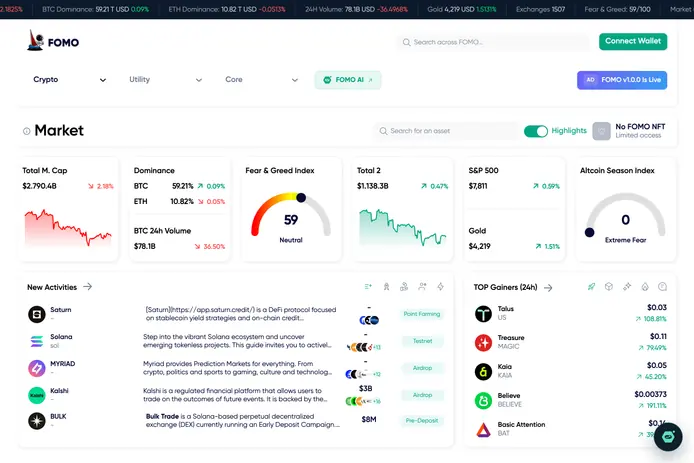
At FOMO, a crypto market intelligence platform, one backend serves the web platform, a mobile app, a Telegram Mini App and the admin. Because the backend is built once, each further interface on top of it — an app, a Mini App — reuses the same accounts, data and logic instead of rebuilding them. If you expect more than one interface, say so before the backend is designed.
How to keep the price down
- Cut roles before screens. One fewer role removes whole flows; one fewer screen saves little.
- Keep the admin on the web. Staff tools rarely need to live in the app.
- Consider a Telegram Mini App for the first version if your audience already lives in Telegram: no install, no store review.
- Consider a PWA for internal tools that need neither deep device access nor a place in the stores.
- Match the build format to the risk. At EVA-X an internal app or a first version for a small test group fits AI Build; a consumer app with payments or personal data is an AI + DEV or DEV job, because store review, devices and edge cases need engineers.
What to have ready before you ask for a price
- The roles, and what each one does in the app
- The core flow, from opening the app to the moment it delivers value
- Whether you already have a backend or an API, and its documentation
- How users pay, if they pay: card, invoice, in-app purchase
- Where people use it: office, road, field, basement
- Which systems it has to exchange data with
- Who owns the developer accounts, and whether they exist yet
With these answers on one page, quotes from different studios finally describe the same app.
How we price an app
Describe the app in your own words — text, a link, a file or a voice message — and the estimate breaks it into modules — app screens, backend, admin, store release — with hours, a timeline and a price in about 15 seconds. The estimate is free and non-binding: our team reviews the scope with you, and the contract fixes the price. We publish the app under your developer account, so the store listing is yours from the first release, and the rights to the code pass to you on full payment under the contract. More on what we build: mobile app development.
Questions and answers
How much does a simple mobile app cost?
If “simple” means a few screens on top of an existing backend, roughly $8,000–$25,000. If the app needs its own accounts, database, payments and admin, it is a business app, and $25,000–$70,000 is the more honest orientation. The quickest way to see where yours lands is to list the roles and the core flow and get an estimate.
Is it cheaper to build for iOS or Android first?
With two native apps, starting on one platform cuts the app part of the first bill roughly in half and leaves the other for later; the backend and admin cost the same either way. With React Native and Expo both platforms come from one codebase, so dropping one saves much less — mostly testing and store work. Choose by where your users are, not by the build budget.
How much does it cost to maintain an app per year?
There is no honest fixed percentage. Add up developer accounts, hosting and third-party services, which grow with your users; a yearly update for new iOS and Android versions; and support and fixes. New features are a separate budget. Ask for maintenance to be priced as its own agreement rather than assumed.
Why do mobile app quotes differ so much?
Usually because they cover different things. One includes the backend, admin and store release; another only the app screens. One assumes cross-platform, another two native apps. One prices a fixed scope, another gives an hourly estimate. Ask every vendor for a list of modules with hours and compare them line by line.
Does my app need a backend?
Almost always. Accounts, data, payments and push notifications live on a server. If you already have an API that exposes what the app needs, we connect to it and the price drops. If you don’t, the backend and an admin panel are built together with the app, by the same team.
Will the app be published under my name?
It should be. Register the Apple and Google developer accounts in your company’s name and give the developer access. At EVA-X we prepare the builds, follow the store review requirements and publish under your account, so the listing and its reviews sit in your account from day one. The rights to the code pass to you on full payment under the contract.
// We build this
Mobile app development
iOS and Android apps on React Native and Expo, with the backend and admin behind them.
About the service →App development cost calculator →Describe the product. Get a fixed price.
Text, a link or a file is enough. The estimate takes about 15 seconds and costs nothing; our team reviews it before any contract.
Get a fixed price